Design7 min read
30+ Invoice Templates: How to Choose the Right Design for Your Business (2026)
February 8, 2026
Quick answer
Your invoice design says a lot about your brand. Discover how to pick from 30+ templates — modern, corporate, creative, and minimal styles for every business.
Why Your Template Choice Matters
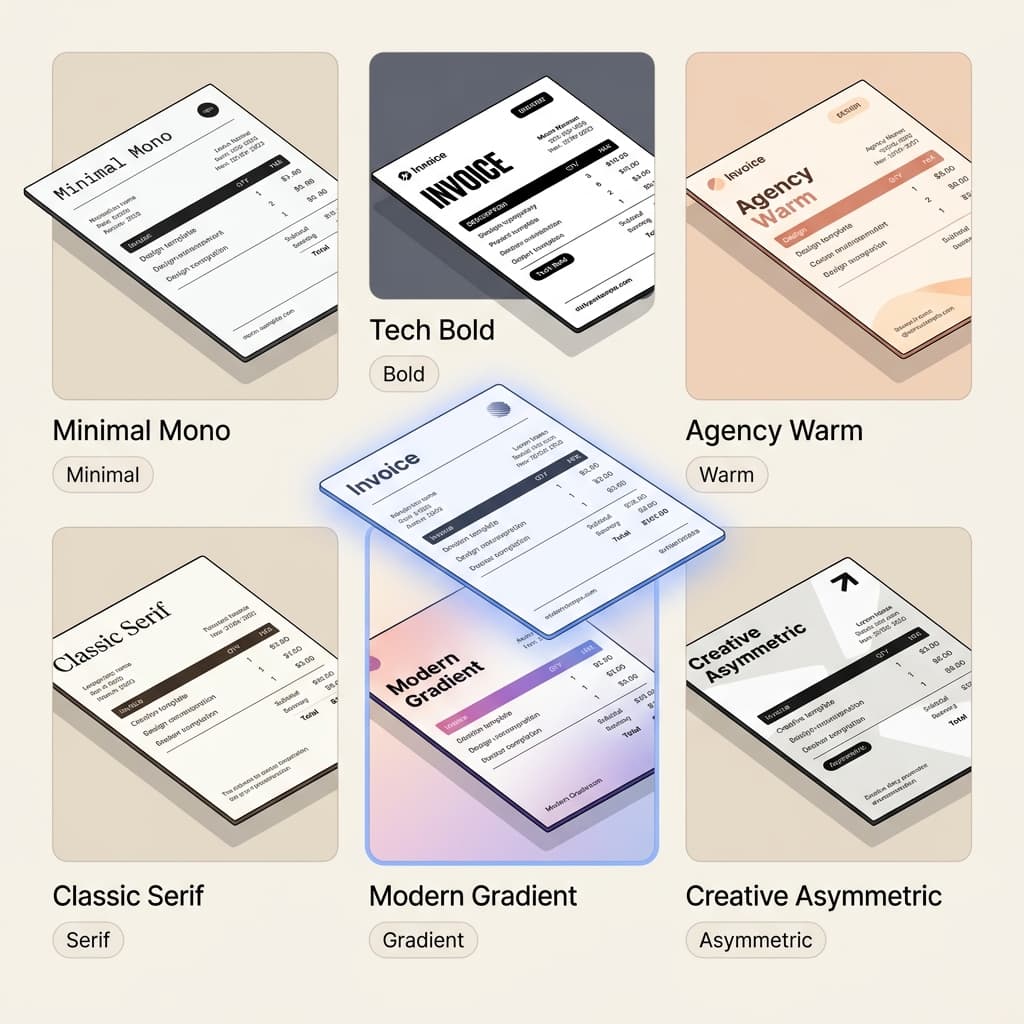
The template you use for your invoices, quotations, and proposals directly impacts how clients perceive your business. A well-designed document builds trust, looks professional, and can even speed up payments. In 2026, generic-looking invoices simply won't cut it.
Template Categories in SuiteZai
SuiteZai offers 30+ templates across three document types, organized into distinct styles:
Invoice Templates (10+ designs)
- Modern Minimal: Clean layouts with lots of white space. Perfect for tech companies, startups, and digital agencies. Uses bold typography and subtle accent colors.
- Corporate Professional: Structured, formal layouts ideal for consulting firms, law offices, and enterprise clients. Features clear hierarchies and traditional formatting.
- Creative Bold: Eye-catching designs with color blocks, unique layouts, and personality. Great for designers, photographers, and creative freelancers.
- Classic Simple: Timeless, no-nonsense designs that work for any industry. Focuses on readability and clarity above all else.
Quotation Templates (7+ designs)
- Detailed Breakdown: Templates with clear line-item sections, quantity columns, and subtotal calculations. Ideal for itemized price estimates.
- Summary Style: Cleaner layouts that present pricing in a more narrative format. Better for service-based businesses where line items aren't needed.
- Branded Premium: High-end designs with logo placement, brand colors, and professional touches that make your quote stand out from competitors.
Proposal Templates (7+ designs)
- Executive: Multi-section layouts with executive summary, scope, timeline, and pricing. Perfect for large project proposals.
- One-Page: Concise, single-page proposals for smaller projects. Gets straight to the point without overwhelming the client.
- Portfolio Style: Proposals that incorporate visual elements and past work references. Ideal for creative agencies and design firms.
How to Choose the Right Template
- Know your audience: A law firm client expects formal design. A startup founder appreciates modern, clean aesthetics.
- Match your brand: Use templates that complement your logo colors and brand personality. SuiteZai lets you customize colors on any template.
- Consider the document type: An invoice needs clarity above all. A proposal can be more visually engaging. Match complexity to purpose.
- Test different styles: SuiteZai lets you switch templates instantly with the same data — preview multiple designs before sending.
Customization Options
Every SuiteZai template supports:
- Custom logo upload and placement
- Brand color adjustments
- Custom watermark overlays (your logo as a background watermark)
- Flexible field arrangement
- Digital signature placement
- Multi-currency formatting
Template Best Practices
- Stay consistent: Use the same template style across all your documents (invoices, quotes, proposals) for brand consistency.
- Don't overcrowd: White space is your friend. A clean invoice is easier to read and looks more professional.
- Include all required fields: Invoice number, date, due date, line items, totals, and your contact information are essential.
- Use your brand colors sparingly: One or two accent colors is enough. Too many colors looks unprofessional.
Try All Templates Free
Browse and preview all 30+ templates in SuiteZai — no sign-up required. Find the design that fits your business and start creating professional documents today.
Related resources
Related Topics:
invoice templates 2026free invoice templatesprofessional invoice designquotation templatesproposal templates